HDMI vs DVI vs DisplayPort vs VGA: Comparing Pros & Cons
Introduction:
The world of display connectivity has witnessed incredible advancements over the years, offering users a multitude of options to connect their devices to screens. HDMI, DVI, DisplayPort, and VGA have emerged as some of the most popular choices, each with its own set of advantages and disadvantages. In this article, we will delve into the pros and cons of these four display interfaces, explore their definitions and applications, discuss their future trends, and uncover the diverse ways in which they enrich our daily lives.
Defining the Interfaces:
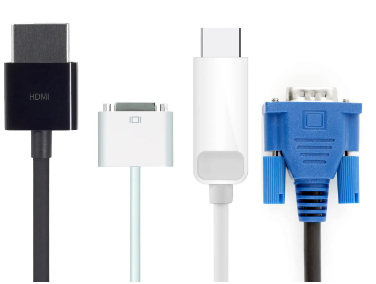
1. HDMI (High-Definition Multimedia Interface): HDMI is a digital interface that transmits both high-definition audio and video signals. It has become the de facto standard for connecting various devices, such as TVs, game consoles, computers, and home theater systems.
2. DVI (Digital Visual Interface): DVI is a video-only interface that can transmit both analog and digital signals. Originally developed for computer displays, DVI supports high-resolution video and is commonly found on computer monitors and graphics cards.
3. DisplayPort: DisplayPort is a digital interface designed to replace older standards. It delivers high-quality audio and video signals and supports multiple display connections through daisy-chaining. DisplayPort is commonly found on computers, monitors, and laptops.
4. VGA (Video Graphics Array): VGA is an analog interface that has been around for decades. It was widely used in the past for connecting computers to displays, but its popularity has dwindled due to the rise of digital interfaces. VGA is still occasionally found on older monitors and projectors.
Applications and Use Cases:
- HDMI: HDMI interfaces are found in a wide range of devices, including televisions, gaming consoles, Blu-ray players, set-top boxes, and audio/video receivers. Its ability to transmit high-definition audio and video signals makes it ideal for home entertainment systems and multimedia setups.
- DVI: DVI interfaces are commonly used to connect computer monitors and graphics cards. They offer support for high-resolution displays and are often utilized in professional settings, such as graphic design and video editing studios.
- DisplayPort: DisplayPort interfaces are prevalent in computer monitors, laptops, and high-end graphics cards. They are widely adopted in industries that require high-resolution displays, such as graphic design, gaming, video production, and CAD/CAM applications.
- VGA: VGA interfaces, though less common nowadays, are still utilized in certain scenarios. They are found in older monitors, projectors, and legacy equipment that do not support digital connections. VGA can be useful for basic display requirements or when connecting to older devices.
Future Trends:
As technology evolves, certain trends are shaping the future of display interfaces:
1. Transition to Digital: Analog interfaces like VGA are gradually being phased out in favor of digital interfaces due to their superior quality and performance. HDMI, DVI, and DisplayPort are expected to dominate the market, while VGA will continue to decline.
2. Higher Resolutions and Refresh Rates: The demand for higher resolutions, such as 4K and 8K, and faster refresh rates is driving the development of display interfaces capable of supporting these advancements. HDMI and DisplayPort are at the forefront of this evolution, with newer versions offering increased bandwidth and enhanced features.
3. USB-C and Thunderbolt Integration: USB-C, a versatile connector, is gaining popularity as it integrates multiple functionalities, including data transfer, power delivery, and display connectivity. Many devices, including laptops and smartphones, are adopting USB-C and Thunderbolt, which can carry DisplayPort signals, further expanding their reach.
4. Wireless Display Technologies: With the rise of wireless technologies, such as Wi-Fi Direct and Miracast, the need for physical display interfaces may diminish. Wireless screen mirroring and casting allow users to transmit audio and video signals without the need for cables.
Enriching Our Lives:
Display interfaces have become an integral part of our daily lives, enhancing our visual experiences in various ways:
- Home Entertainment: HDMI enables us to enjoy high-definition content on our televisions, creating immersive home theater experiences.
- Gaming: Display interfaces like DisplayPort and HDMI deliver smooth gameplay experiences with high refresh rates and low input lag, providing gamers with an edge.
- Professional Applications: DVI and DisplayPort facilitate precise color reproduction and high-resolution displays, benefiting professionals in fields such as graphic design, video editing, and CAD/CAM.
- Education and Presentations: VGA and HDMI connections are commonly used in classrooms and conference rooms, allowing for seamless presentations and multimedia sharing.
Introduction:
In today's digital era, the visual experience plays a crucial role in our daily lives. Whether we are enjoying high-definition movies, playing immersive video games, or working on professional graphic design projects, the quality of our display connectivity matters. HDMI, DVI, DisplayPort, and VGA have emerged as the primary display interface options, each with its own unique set of pros and cons. In this article, we will embark on a comprehensive exploration of these four interfaces, diving into their definitions, applications, features, pros, and cons to help you make informed decisions about your display connectivity needs.
Defining the features and pros and cons of Interfaces:
1. HDMI (High-Definition Multimedia Interface):
- Features:
- Supports high-definition audio and video transmission through a single cable.
- Provides a wide range of resolutions, including Full HD (1080p), 4K, and 8K.
- Supports advanced features like Consumer Electronics Control (CEC) for seamless device communication.
- Pros:
- Simplifies connectivity by combining audio and video signals into a single cable.
- Offers high-quality audio and video transmission.
- Widely adopted in home entertainment systems and multimedia setups.
- Cons:
- Limited cable length compared to other interfaces.
- May require adapters for connecting to older display devices.
- Some older HDMI versions may not support the latest features and resolutions.
2. DVI (Digital Visual Interface):
- Features:
- Supports both analog and digital signals (DVI-A, DVI-D, and DVI-I variants).
- Provides support for high-resolution displays.
- Offers single-link and dual-link configurations for varying bandwidth requirements.
- Pros:
- Compatible with both analog and digital displays.
- Supports high-resolution content and precise color reproduction.
- Widely used in professional settings such as graphic design and video editing.
- Cons:
- Does not support audio transmission (except for DVI-D with additional audio cables).
- Bulkier and less versatile compared to HDMI and DisplayPort.
- Limited to shorter cable lengths compared to other interfaces.
3. DisplayPort:
- Features:
- Provides high-bandwidth transmission for high-resolution content.
- Supports Multi-Stream Transport (MST) for daisy-chaining multiple displays.
- Offers advanced features like High Dynamic Range (HDR) for improved color reproduction.
- Pros:
- Delivers high-quality audio and video signals.
- Offers higher bandwidth compared to HDMI and DVI.
- Suitable for graphic design, gaming, video production, and CAD/CAM applications.
- Cons:
- May require adapters for connecting to older displays.
- Less common in consumer devices compared to HDMI.
- Compatibility with older versions of DisplayPort may vary.
4. VGA (Video Graphics Array):
- Features:
- Analog interface primarily used in legacy equipment and older displays.
- Supports lower resolutions compared to digital interfaces.
- Commonly found in older monitors, projectors, and some legacy devices.
- Pros:
- Wide compatibility with older devices and displays.
- Basic display connectivity for simple requirements.
- Generally more affordable compared to digital interfaces.
- Cons:
- Limited support for high resolutions and advanced features.
- Prone to signal degradation and interference.
- Not suitable for applications requiring high-quality graphics or precise color reproduction.
Applications and Use Cases:
- HDMI:
- Applications: Home entertainment systems, gaming consoles, Blu-ray players, set-top boxes, audio/video receivers.
- Use Cases: Immersive movie viewing, gaming with high-resolution graphics and audio, multimedia setups.
- DVI:
- Applications: Computer monitors, graphics cards in professional settings.
- Use Cases: Graphic design, video editing, high-resolution displays requiring precise color reproduction.
- DisplayPort:
- Applications: Computer monitors, laptops, high-end graphics cards.
- Use Cases: Graphic design, gaming, video production, CAD/CAM applications requiring high-resolution and color-accurate displays.
- VGA:
- Applications: Older monitors, projectors, legacy equipment.
- Use Cases: Basic display connectivity for older devices lacking digital interfaces, simple display requirements.
Pros and Cons:
- HDMI:
- Pros:
- Simplifies connectivity with a single cable for both audio and video.
- High-quality audio and video transmission.
- Wide adoption in home entertainment systems.
- Cons:
- Limited cable length compared to other interfaces.
- May require adapters for older displays.
- Older HDMI versions may lack support for the latest features and resolutions.
- DVI:
- Pros:
- Compatibility with both analog and digital displays.
- High-resolution support and precise color reproduction.
- Widely used in professional settings.
- Cons:
- No audio transmission (except for DVI-D with additional audio cables).
- Bulkier and lessversatile compared to HDMI and DisplayPort.
- Limited cable lengths compared to other interfaces.
- DisplayPort:
- Pros:
- High-quality audio and video signals.
- Higher bandwidth compared to HDMI and DVI.
- Suitable for graphic design, gaming, video production, and CAD/CAM applications.
- Cons:
- May require adapters for older displays.
- Less common in consumer devices compared to HDMI.
- Compatibility with older versions of DisplayPort may vary.
- VGA:
- Pros:
- Wide compatibility with older devices and displays.
- Basic display connectivity for simple requirements.
- Generally more affordable compared to digital interfaces.
- Cons:
- Limited support for high resolutions and advanced features.
- Prone to signal degradation and interference.
- Not suitable for applications requiring high-quality graphics or precise color reproduction.
Types of DVI
DVI (Digital Visual Interface) is a video display interface that was commonly used before the introduction of HDMI (High-Definition Multimedia Interface). DVI supports both analog and digital video signals, and there are several variations of the DVI interface, including DVI-I, DVI-D, and DVI-A.
1. DVI-I (Digital Visual Interface-Integrated): DVI-I ports can transmit both digital and analog signals. This means that a DVI-I port can support both DVI-D and DVI-A cables. It is compatible with both digital displays (such as LCD monitors) and analog displays (such as CRT monitors) by using the appropriate cable or adapter.
2. DVI-D (Digital Visual Interface-Digital): DVI-D ports can only transmit digital video signals. They do not support analog signals, so they cannot be used with analog displays directly. DVI-D is commonly used to connect digital displays, such as LCD monitors or projectors, to devices like computers or DVD players that also output digital signals.
3. DVI-A (Digital Visual Interface-Analog): DVI-A ports can only transmit analog video signals. They do not support digital signals. DVI-A is used to connect analog displays, such as CRT monitors, to devices that output analog signals. It is not as common as DVI-D or DVI-I.
Regarding HDCP (High-bandwidth Digital Content Protection), it is a form of digital copy protection used to prevent unauthorized copying of high-definition content. HDCP is typically associated with digital video connections like HDMI and DisplayPort.
In the case of DVI, most DVI ports do not support HDCP. This means that if you have a DVI connection between a video source (such as a Blu-ray player) and a display (such as an HDTV), you may encounter issues with HDCP-protected content. Some video sources may refuse to display the content or downgrade the quality if HDCP is not supported.
However, it's important to note that newer devices, such as modern graphics cards and monitors, often include HDCP support on their DVI ports. So, if both the video source and the display device support HDCP over DVI, you should be able to play HDCP-protected content without any issues.
To summarize, DVI-I supports both digital and analog signals, DVI-D supports only digital signals, and DVI-A supports only analog signals. Most DVI ports lack HDCP support, but newer devices may include HDCP on their DVI ports. It's always a good idea to check the specifications of your devices to ensure compatibility and support for the features you require.
Conclusion:
HDMI, DVI, DisplayPort, and VGA are all unique display interfaces with their own strengths and weaknesses. While HDMI has become the go-to choice for home entertainment, DVI and DisplayPort cater to different professional applications, and VGA lingers as a legacy option. As technology advances, we can expect to see higher resolutions, faster refresh rates, and increased integration with USB-C and wireless technologies. These display interfaces continue to enrich our lives by delivering stunning visualsand seamless connectivity in various aspects of our daily routines, from entertainment to work and education. As we embrace the future, the possibilities for display interfaces are boundless, promising even more captivating visual experiences and convenient connectivity options.


Frequently Asked Questions
Related Articles

What is Series Parallel Circuit? Formula, Diagram, Calculator
Potentiometers Classifications Explained: Construction, Application
What is Peak-to-Peak Voltage, AC Peak vs. Peak-to-Peak vs. RMS Voltage
Outdoor vs. Indoor TV Antennas: How They Work?
SO-DIMM vs DIMM vs UDIMM Difference: Understanding Meaning and Types
Time Delay Relay: Definition,Modes,Diagram
How to use a Relay: Comprehensive Guide for Relays Types and Uses
What is a Projector: Working Principle and Types
Detailed Inductors Classifications
Unveiling the Complexities of AI Face Recognition: Algorithmic Bias, Ethics, and Regulation
Apple’s NameDrop in iOS 17: Advantages, Disadvantages, and Proper Usage
How to Erase Your Personal Data from Public Record Websites