Digital to Analog Audio Converters Demystification
In today's digital world, where music and audio are readily available in digital formats, the need for high-quality audio conversion has become paramount. This is where Digital to Analog Audio Converters (DACs) come into play. These devices bridge the gap between the digital realm and the analog world, transforming digital audio signals into analog signals that can be played through traditional audio equipment like speakers and headphones.
What is a Digital to Analog Audio Converter?
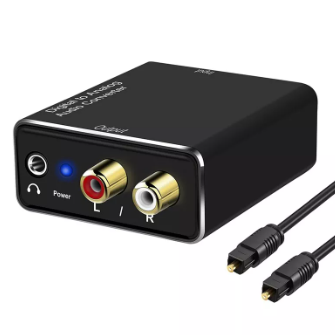
A Digital to Analog Audio Converter, often abbreviated as DAC, is an electronic device that converts digital audio signals into analog audio signals. Digital audio signals are represented by a series of binary digits (0s and 1s), while analog audio signals are continuous electrical waveforms. DACs interpret these digital codes and translate them into corresponding analog waveforms, allowing us to hear the audio content on our analog devices.
How to Connect a Digital to Analog Audio Converter to a Smart TV
Connecting a DAC to a Smart TV is a straightforward process, typically involving the following steps:
1. Identify the available digital outputs on your TV: Most Smart TVs offer digital audio outputs like Optical (Toslink) or Coaxial (RCA). Locate these ports on your TV.
2. Choose the appropriate cable: Depending on the available output on your TV, select either an Optical cable for Toslink or a Coaxial cable for RCA.
3. Connect the DAC to the TV: Plug one end of the chosen cable into the digital audio output on your TV and the other end into the corresponding input on your DAC.
4. Connect the DAC to your audio equipment: Use an analog audio cable (RCA or 3.5mm) to connect the DAC's analog outputs to your speakers or headphones.
5. Select the correct audio output on your TV: Navigate to your TV's audio settings and ensure the digital audio output (Optical or Coaxial) is selected.
6. Power on your devices and enjoy the enhanced audio: Turn on your TV, DAC, and audio equipment, and you should now be able to hear the audio from your TV through your connected speakers or headphones.
What is a Digital to Analog Converter Used For?
DACs find application in various scenarios where digital audio needs to be converted to analog:
Home Entertainment Systems: Connecting a DAC to your Smart TV, Blu-ray player, or streaming device can significantly improve the audio quality of movies, music, and games.
Audiophile Listening: Audiophiles often use high-end DACs to achieve the best possible sound quality from their digital audio sources.
Professional Audio Production: Recording studios and live sound engineers rely on DACs to convert digital audio recordings to analog signals for playback and mixing.
Portable Audio Devices: Some portable music players and smartphones incorporate DACs to enhance the sound quality of digital music files.
Do I Need a Digital to Analog Audio Converter?
Whether you need a DAC depends on your specific needs and setup:
If you are satisfied with the sound quality of your current setup, you may not need a DAC.
However, if you are looking to improve the audio quality of your digital sources, a DAC can make a significant difference. This is especially true if you have high-quality audio equipment like high-end speakers or headphones.
Additionally, if you are experiencing audio issues like static or distortion, a DAC may help to resolve these problems.
How Does a Digital-to-Analog Converter Affect Sound Quality?
DACs can significantly impact sound quality in several ways:
Improved Signal-to-Noise Ratio: DACs can reduce noise and distortion in the audio signal, resulting in a cleaner and more accurate sound.
Wider Dynamic Range: DACs can expand the dynamic range of the audio signal, allowing you to hear both the quietest and loudest sounds with greater clarity.
More Accurate Frequency Response: DACs can reproduce the full frequency range of the audio signal more accurately, leading to a more natural and realistic sound.
Reduced Jitter: DACs can minimize timing errors (jitter) in the digital-to-analog conversion process, resulting in a smoother and more detailed sound.
Digital to Analog Audio Converters Recommendation
Here are some highly-rated DACs for different needs and budgets:
Budget-Friendly:
FiiO E10K Olympus 2: A compact and affordable DAC with a headphone amplifier.
SMSL Sanskrit 10th MKII: A versatile DAC with multiple digital inputs and a built-in headphone amplifier.
Mid-Range:
Schiit Audio Modi 3: A popular DAC with excellent sound quality and a variety of features.
AudioQuest DragonFly Cobalt: A portable DAC with high-resolution audio support and a built-in headphone amplifier.
High-End:
Chord Electronics Qutest: A high-performance DAC with cutting-edge technology and exceptional sound quality.
Mytek Brooklyn Bridge: A versatile DAC with multiple digital inputs, analog outputs, and a built-in headphone amplifier.
Conclusion
Digital to Analog Audio Converters play a crucial role in bridging the gap between the digital and analog audio worlds, allowing us to enjoy high-quality audio from our digital sources. Whether you are an audiophile seeking the ultimate listening experience or simply want to improve the sound quality of your home entertainment system, a DAC can make a significant difference. By understanding the role and benefits of DACs, you can choose the right device to elevate your audio experience and enjoy your favorite music, movies, and games with enhanced clarity and detail.


Frequently Asked Questions
Related Articles

PMIC Selection and Design Considerations
Digital to Analog Audio Converters Demystification
Microwave Diode Test:Replacement,Cost,Diagram
What Is Fiber Optic Attenuator:Working,Types,How to choose?
Pull-Up & Pull-Down Resistors Difference, Pros & Cons, Selection
Unveiling Metal Oxide Resistors: Mastering Current Control
555 Timer: Applications, Pinout, Pros & Cons
Smoke Detector Installation and Testing|How Many Do You Need?
Solid State Drives Inner Workings And Diverse Varieties
How do Hard Disk Drives Work? Operation, Types Explain
Ultimate Tutorial to JTAG: Understanding the Basics and Operation
What is USB Cable, How to Install a USB Expander?